
Take Care Of Black Sprunki - Adoption Choices and Care Routines Explained
Adopt a lonely Black Sprunki from a rainy alley and Take Care Of Black Sprunki through feeding, bathing, and play activities in this browser-based virtual-pet game—but refuse the adoption, and watch the cozy home transform into a dark, unsettling bad ending. Choose wisely, because your initial decision carries real consequences in this expressive character-driven experience.
Please wait a moment for the Take Care Of Black Sprunki game to load after clicking "Play Now" button.
Play Take Care Of Black Sprunki in Browser Online
Recommended Games
View all
Sprunki Sprunkswap
Sprunki Phase 10 Jevins Last Stand
Sprunki Twirl Shifted Remastered
Sprunki Sprunktuber Japanese
Sprunki Phase3 An Endless Hell
Ay In Tick Drop Sprunkie But Every Sprunki Are K111Ers
Sprunki 9 Shifted Player Baldis Take
Sprunki 5 Shifted Finalized
Sprunki Spi Shifted Remastered
Sprunki Phase 3 The End
Ay In Color Sprunki Edition
Ay In Tick Drop Sprunkies But Mr Sun And Mr Tree Is Sick
Sprunki Reverse Shifted Phase 4
Sprunki Hdpe Shifted Chapter 1 Time Two Go Green
Sprunki Heptashifted Conizs Chornology
Sprunki The Definitive Phase 12 Esbs Take Deluxe Edition
Sprunki Voided Phase 6 Stargazing
Sprunki But Heptashifted Conizs Chornology
Take Care of Black Sprunki is a virtual-pet game that starts with a choice: adopt a lonely Black Sprunki from a rainy aley, and the scene transforms into a cozy home where you feed, play with, and care for your new companion.
Take Care of Black Sprunki
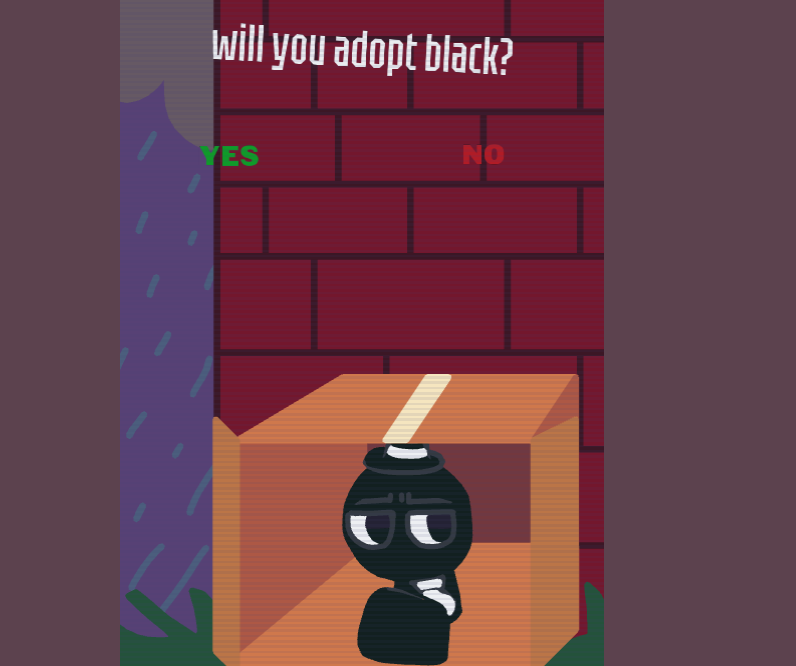
Take Care of Black Sprunki is a browser-based virtualpet game that opens with a single adoption choice. A lone Black Sprunki sits inside a cardboard box in a rainy alley, and players decide whether to bring him home.
Selecting “Yes” unlocks a compact domestic space filled with feeding, bathing, sleeping, and play stations.
Choosing “No” triggers a stark visual shift—muted blue-gray gives way to black and deep red imagery—before ending on a “Bad ending…” message. Created by @Mr_Dawa, the game uses expressive character art and handwritten room labels instead of stat meters or complex menus.
Domestic Routines and Outdoor Exploration
Care activities function as standalone interactive vignettes rather than tracked metrics. In the feeding area, Black sits behind a bowl with food items ready to be dragged into position. The bath scene places him in a tub with soap, a towel, and a shower head nearby. The bedroom dims under a cone of lamplight as he settles beneath a blanket. Black’s heavy-lidded eyes, white tie, and small hat remain consistent across rooms, while his facial reactions and body positioning communicate feedback.
Stepping through the front door opens a grassy outdoor area doted with houses and trees. The interface shifts to direct movement controls: a virtual directional stick on the left and a jump button on the right. This section expands the physical environment but lacks the labeled goals of the indoor stations.
Touch Interactions and Scene Controls
Each room and minigame features its own layout, so the interaction scheme changes depending on the active scene. The game relies on tap and drag inputs designed for touchscreens.
| Action | Input | Result |
|---|---|---|
| Select activity or branch | Tap or click on-screen label | Opens care room, minigame, or story path |
| Interact with care items | Tap or drag visible item | Applies food, bath tools, or room props |
| Explore outdoor yard | Virtual stick and jump button | Navigates the grassy exterior environment |
| Play Flappy Bird minigame | Repeated taps or clicks | Keeps character airborne to pass between pipes |
| Paint on drawing canvas | Drag cursor across canvas | Applies selected color and brush size |
Several room labels use thin handwritten lettering, and certain utility icons are small. Individual care routines rarely provide text instructions, leaving players to figure out interactive objects based on context clues or cursor shape. A reset arrow or home icon restores the screen when an interaction stalls.
Minigames and Unfinished Phone Apps
The in-game smartphone opens a grid of app icons hosting secondary activities. The most complete is a Black Sprunki adaptation of Flappy Bird. Players tap repeatedly to guide the floating character between scrolling pipes against a pale mountainous background while a two-digit counter tracks progress. Missing a gap triggers a Game Over screen with Retry and Go back options.
The drawing app provides a blank canvas with brush size controls, a bright and neutral color palette, a reset button, and a snapshot feature. Another utility arranges eyes, limbs, and body shapes across the screen alongside a camera icon.
Several icons advertised on the phone interface do not lead to functional scenes in this build. Player feedback notes that the title remains under active development. The available minigames provide decent variety even with incomplete phone apps.
The Consequence of Refusal
The opening choice to reject or adopt Black is one of the game’s most effective structural decisions. Skipping the adoption prompt does not return to a title screen; it triggers an unsettling sequence that reframes Black from a helpless creature in a wet cardboard box into a threatening figure. The transition into dark red imagery achieves its effect through atmospheric visual changes rather than graphic violence.
This abrupt divergence gives the initial prompt genuine weight. By tying pet care gameplay to a positive choice while punishing refusal with a sudden bad ending, the narrative framing justifies itself immediately. Individual interactions lack deep long-term progression, but the combination of expressive character art, varied activity vignettes, and a memorable opening twist ensures this brief collection leaves a strong impression.
How to Play Take Care of Black Sprunki
Select “Yes” when the alley scene asks whether to adopt Black Sprunki. This opens the home area, where handwritten signs lead to the main care activities.
- Feed Black: In the eating area, tap or drag food into Black’s bowl. His expression indicates how the interaction is going; there are no numerical hunger meters.
- Bathe and rest: Use the bath or bedroom stations. Interact with visible items such as soap, shower head, blanket, and lamp to complete each care scene.
- Play and explore: Go through the front door to reach a grassy outdoor area. A virtual stick on the left controls movement, while the button on the right makes Black jump.
- Use the phone: Black’s smartphone includes a tap-controlled Flappy Bird-style minigame and a drawing canvas with colors, brush sizes, reset, and snapshot controls.
Most actions use simple taps and drag inputs. If an object does not respond, use the reset arrow or home icon to restore the scene.
Related Games
- Will You Adopt Brud Sprunki — This is the closest follow-up for players who enjoyed the adoption-choice framing and character-focused virtual-pet premise of caring for Black Sprunki.
- Gray Guardian Sprunki Care Collection — Its Sprunki care-collection focus makes it a natural next pick for players seeking more feeding, bathing, resting, and companion-style interactions.
Enjoy!
New Games
View all
Sprunki Reversed Shadows Take Is Finally Out
Dashmetry Winter
Granny 4
Dandy's World Original
Sprunki 5 Shifted Swapped
Sprunki Definitive Phase 12 Cattoads Take
Sprunki Phase 60

Hornet Adventure
ZZZ Holiday Tree Tuner
Idle Monster Slayer
Chicken Universe

Tap Rich Idle
Sprunki Phase 1.5 Player Baldis Take
Sprunki Phase 5 Glore Galore
Crazy Tractor
Sprunki Phase 3.5 Definitive Redefined Player Baldis Take
Previous
Gray Guardian Sprunki Care Collection
Next
Sprunki Save Pinki From Gray
Discuss Take Care Of Black Sprunki